How to join a Minecraft server on console
PS5, PS4, Xbox and Nintendo Switch cannot type a server address, so EconomySMP uses a friend bot. Add the bot in the Friends tab of Minecraft Bedrock, wait up to 3 minutes, then join the EconomySMP world from the Friends tab.
Steps for every console
- Open Minecraft Bedrock Edition and go to the Friends tab.
- Choose Add Friend and search for the server's bot gamertag. The exact name is on the join page for your console.
- Add the account. The bot accepts within about 3 minutes.
- Open the Friends tab and join the EconomySMP world.
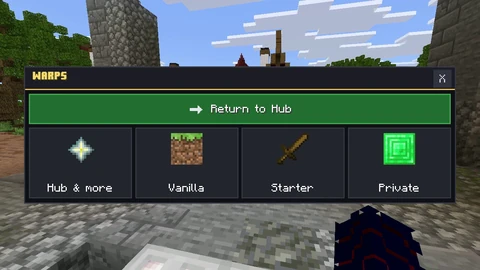
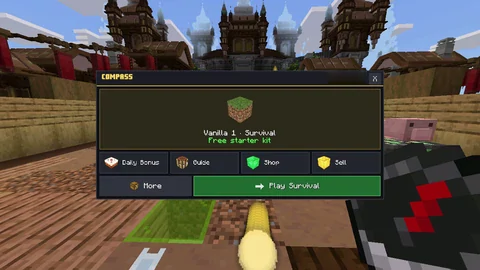
- You arrive in the Hub. Pick a world with /warps.
Which devices use the bot and which use the address
The method depends on the device, not on you. Every Bedrock device ends up on the same server, so you can play with friends on any of them.
- PS5, PS4, Xbox One, Xbox Series X and S, Nintendo Switch: the friend bot. No address field exists.
- iPhone, iPad, Android and Windows: add play.esmp.me with port 19132 in the Servers tab.
- Java Edition: add play.esmp.me with no port. Supported versions are 26.1 to 26.3.
Console pages
Each console has a page with the steps and the current bot gamertag: /join/xbox, /join/playstation (PS4 and PS5) and /join/switch. The steps are the same on all three. For more detail see the guides for PS5 and PS4, Xbox and Switch.
Why there is no Add Server button
Minecraft on PS5, PS4, Xbox and Switch has no field for a custom server address, so searches like "minecraft ps5 servers" or "add server on ps5" end at the same place: you need a way in that works through the Friends tab. EconomySMP's friend bot is that way. You do not need a phone, a second device or a separate app.
Troubleshooting: the bot or the world does not show up
If it still fails, ask in the Discord at discord.gg/economysmp.
- Open Friends and check the bot is under your friends, not under pending. It accepts within about 3 minutes.
- Copy the gamertag from the join page for your console. The bot can change when one is full.
- Restart Minecraft, and check that you are signed in to the same Microsoft account that sent the request.
- Privacy: Privacy settings are set at account.xbox.com/settings by an adult: under Online Safety allow Play multiplayer games and Add friends on Xbox Live, and under Privacy allow chat in multiplayer games and cross-network play. Then sign out of Minecraft and back in.
- Child accounts cannot change these settings. A parent in the Microsoft family group has to allow multiplayer, adding friends and cross-network play.
- PlayStation needs PlayStation Plus and Switch needs Nintendo Switch Online for online play in Minecraft. Both are the platform's rule. EconomySMP is free.
- Update Minecraft from your console store.
Join back later and get a reward
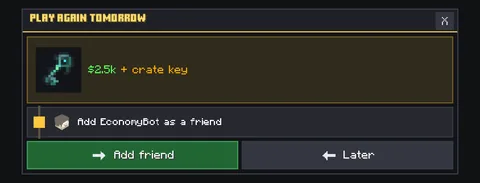
Once the bot is your friend you can join from your friends list any time. Type /join in game to see how. After 30 minutes of play the Stay Connected prompt pays $2,500, a Merchant Crate Key and 24 hours of VIP for friending the bot.
Questions
How do I join a Minecraft server on console?
Open Minecraft Bedrock, go to Friends, add the server's friend bot and join its world from the Friends tab. Consoles cannot type a server address.
Can I join EconomySMP on Xbox?
Yes. Add the friend bot in the Friends tab of Minecraft Bedrock. It accepts within about 3 minutes, then you join the world from your friends list.
Can I play EconomySMP on Nintendo Switch?
Yes. The steps are the same as on Xbox and PlayStation: add the friend bot and join from the Friends tab.
Why is my Minecraft server not showing in Friends on Xbox, PS5 or Switch?
The bot has to accept your request first, so check it is under your friends and not pending. Then restart Minecraft, make sure the same Microsoft account is signed in, and check the account may play multiplayer and join cross-network play.
Can I join a Minecraft server on console without an app, a phone or BedrockTogether?
Yes. Add the friend bot inside Minecraft and join from the Friends tab. EconomySMP needs no extra app, phone or second device.
How do I rejoin EconomySMP on console later?
Once the bot is your friend, join from your friends list. Type /join in game to see how and to open the bot's profile.