How to join a Minecraft server on PS5 and PS4
You cannot type a server address on PS5 or PS4, so EconomySMP uses a friend bot. Add the bot in the Friends tab of Minecraft Bedrock, wait up to 3 minutes, then join the EconomySMP world from your friends list.
Steps on PS5 and PS4
- Start Minecraft Bedrock Edition and open the Friends tab.
- Choose Add Friend and search for the server's bot gamertag. The exact name is on the PlayStation join page at /join/playstation.
- Send the request. The bot accepts within about 3 minutes.
- Open the Friends tab again and join the EconomySMP world.
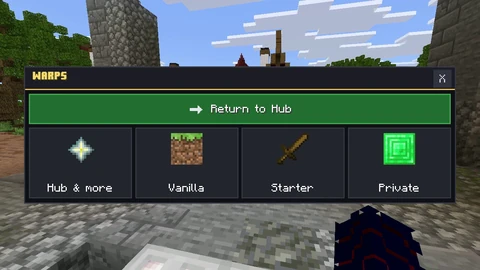
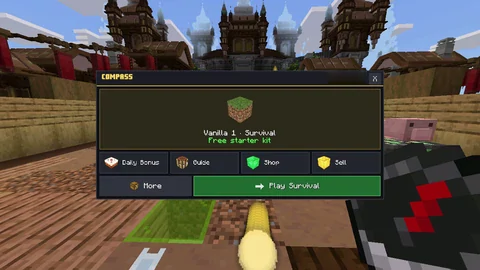
- You land in the Hub. Type /warps and pick a world.
PlayStation specifics
The friend bot is a Microsoft (Xbox) account, and Minecraft Bedrock shows it in its own Friends tab. So on PlayStation the request is sent inside Minecraft, not from the PS5 friends list.
- Sign in to a Microsoft account inside Minecraft first. Without it the Friends tab cannot add anyone.
- PS4 and PS5 may need a PlayStation Plus membership for online play. That is a Sony rule: joining EconomySMP itself is free.
- Use the Bedrock version of Minecraft, not a Java launcher. The PlayStation edition is Bedrock.
- Type the gamertag from /join/playstation exactly. The PS5 on-screen keyboard makes l, I and 1 easy to mix up.
Why a friend bot
PS4 and PS5 cannot type a server address. The friend bot is the way in: once it is your friend, you join from the Friends tab.
The server itself is at play.esmp.me. Phones and PC add that address by hand. Consoles use the bot.
Join again later
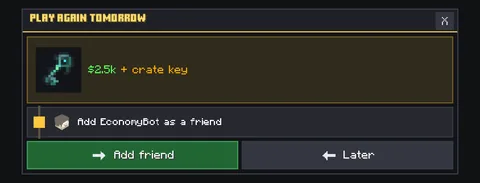
Once the bot is your friend, you join from the Friends tab any time. Type /join in game to see how. After 30 minutes of play, the Stay Connected prompt pays $2,500, a Merchant Crate Key and 24 hours of VIP for friending the bot.
If it does not work
- Wait the full 3 minutes and check the Friends tab again.
- Check that you typed the bot gamertag exactly as shown on the join page.
- If online play is refused, check that PlayStation Plus is active. Sony lists it as required for online play in Minecraft.
- Check the Microsoft account's privacy settings at account.xbox.com/settings: allow multiplayer, adding friends and cross-network play. A child account needs a parent to do this in the Microsoft family group.
- There is no Add Server button on PS5 Minecraft, and there will not be one here: use the friend bot instead.
- Ask in the Discord at discord.gg/economysmp or email support@economysmp.shop.
Questions
How do I join a Minecraft server on PS5?
Open Minecraft Bedrock, go to Friends, add the server's friend bot and join its world from the Friends tab. PS5 cannot type a server address.
Why is there no Add Server button in Minecraft on PS5?
Console Minecraft has no custom server address field. Add the EconomySMP friend bot in the Friends tab instead.
Do I need PlayStation Plus to join a Minecraft server on PS5?
Sony lists PlayStation Plus as required for online play in Minecraft. EconomySMP is free, but your console needs that subscription to go online.
Does the same method work on PS4?
Yes. PS4 and PS5 use the same steps.
Is EconomySMP free on PlayStation?
Yes. Joining and playing are free. Ranks and Gems are optional and sold in the store.
Can PlayStation players play with Java players?
Yes. Bedrock and Java players share the same server.