Minecraft server lag: how to tell what is slow and fix it
Lag on a Minecraft server is either the server running slow or your connection and device running slow, and the fixes differ. The server shows its speed as TPS, and 20 is normal. If TPS is 20 and the game still stutters, the problem is on your side.
First, find out which side is slow
Blocks that reappear after you break them and mobs that rubber-band point to a slow server or connection. Low frame rate with normal block behavior points to your device.
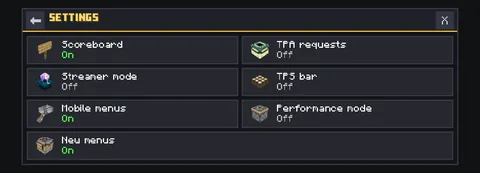
- On EconomySMP, type /settings (or open the Compass and choose Settings) on a survival server and switch on Show TPS debug bar. Server ticks per second appear on your action bar.
- Read the number. A healthy server runs 20 ticks per second. Much lower means the server is busy.
- If TPS is normal, check your own frame rate and connection.
If the server is slow
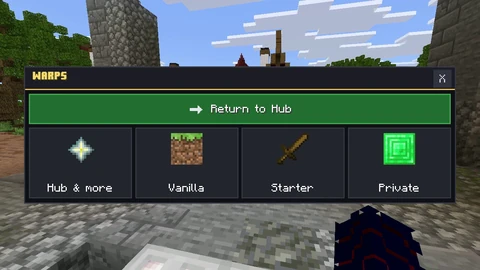
- Change world. Type /warps and pick a quieter survival world, or /vanilla for your last Vanilla world.
- Go back to the Hub with /hub and rejoin the world after a minute.
- Stay out of huge farms and machine rooms in the moment. Large redstone and mob farms cost the server time.
- Report it with /bug if one place is always slow.
If your device or connection is slow
- Lower render distance and simulation distance in Minecraft's video settings.
- Close other apps. On a phone, close background apps and turn off battery saver.
- Use a wired connection or sit nearer the router. A shaky Wi-Fi link causes rubber-banding.
- Update Minecraft. An outdated client can behave badly or be refused.
When to switch worlds or wait
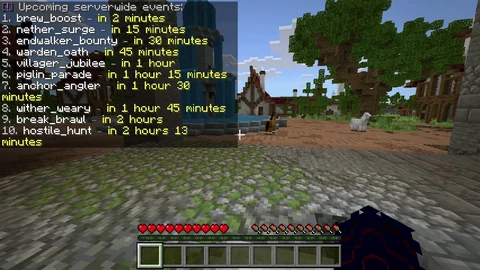
A single laggy minute during a busy event is normal: serverwide events start about every 10 minutes and many players run to the same spot. If lag lasts, move to another world with /warps and tell staff in the Discord.
Questions
How do I check Minecraft server lag?
Switch on Show TPS debug bar in EconomySMP's settings. It shows server ticks per second. 20 is normal.
Why is my Minecraft server lagging?
Either the server is busy or your connection or device is slow. Check TPS first, then your frame rate and Wi-Fi.
Does changing worlds help with lag?
Often yes. If you are on a busy Vanilla world, /warps lists the others, and /vanilla picks the quieter of Vanilla 1 and 3 when your last world is not ready.
Is there a no-lag Minecraft server?
No server is free of lag at all times. Check the TPS bar and pick a quiet world.
Will lowering render distance help?
Yes, if the stutter is on your device. It does nothing for a slow server.