Minecraft server buy orders: deliver goods to a corporation on EconomySMP
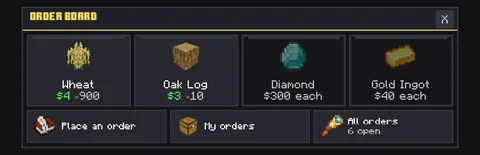
The order board is where corporations post buy orders for items at a fixed price. Any player can deliver items and get paid per item. Find the Orders chest at the Hub market and choose View Orders.
Fill an order
A delivery larger than the remaining need is refused as a whole, for example when another player filled part of the order first. Reopen the board and try again.
- Open the Orders chest at the Hub market and choose View Orders.
- Pick an item. The list shows the best-paying order first.
- Enter how many to deliver. You are limited by what you carry and what the order still needs.
- You are paid per item and the items go to the buying corporation's warehouse.
Place an order
Placing needs Executive, COO or CEO rank in your corporation.
- Choose Place Order, search the item, then set the amount and price per item.
- For books, type the enchantment and level, for example sharpness 5.
- The full price is held from the corporation bank when you place the order.
- Only orders with 0% filled can be cancelled. The unused money returns to the bank.
Why use orders
An order pays a price someone chose, so you skip listing and waiting. It suits bulk goods such as crops and ores. Check the shop price first with /sell, since a fixed order can pay below or above it. /orders lists current orders from Discord with a linked account.
Learn more
Questions
Who can place a buy order?
Executive, COO and CEO ranks of a corporation.
Where do delivered items go?
To the buying corporation's warehouse.
Can I cancel an order?
Only while it is 0% filled. The unused money returns to the corporation bank.
Can I see orders from Discord?
Yes. /orders lists current orders for a linked account.